Shadcn
Controls styled after Shadcn, built on the Flutter
shadcn_ui package, plus the
Lucide icon set.
Usage
Add flet-shadcn-ui to your project dependencies:
- uv
- pip
uv add flet-shadcn-ui
pip install flet-shadcn-ui
Then import it, typically under the shad alias:
import flet as ft
import flet_shadcn_ui as shad


def main(page: ft.Page):
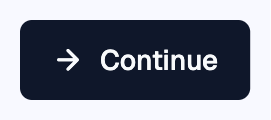
    page.add(shad.Button("Continue", leading=shad.LucideIcons.ARROW_RIGHT))


ft.run(main)
Theming
The controls work without any setup. A control that is not inside a
Theme uses the SLATE color
scheme and follows the page's light or dark theme_mode.
To use another color scheme, a fixed brightness or a different corner radius,
wrap controls in a Theme:
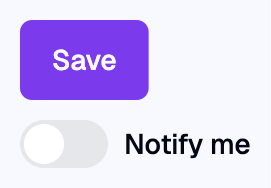
shad.Theme(
    color_scheme=shad.ColorScheme.VIOLET,
    content=ft.Column([shad.Button("Save"), shad.Switch(label="Notify me")]),
)
Icons
LucideIcons contains the Lucide icons. It can be used
anywhere Flet accepts an icon, including core controls such as
Icon and IconButton.
ft.Row(
    tight=True,
    controls=[
        ft.Icon(shad.LucideIcons.HOUSE),
        ft.Icon(shad.LucideIcons.BELL, color=ft.Colors.AMBER),
        ft.IconButton(shad.LucideIcons.SETTINGS),
        shad.IconButton(icon=shad.LucideIcons.HEART),
    ],
)

Forms
Value controls can show a label, helper text and a validation error, so a form is a column of fields validated in your Python code.
Input, Textarea, Select, InputOTP, DatePicker, DateRangePicker, TimePicker and RadioGroup have these properties:
labelis shown above the field.descriptionis helper text shown below the field.error_textis an error message shown in red below the field. While it is set, the label and the field's border turn red too.
Checkbox and Switch already have a label and a
sublabel next to them, so they only add error_text.
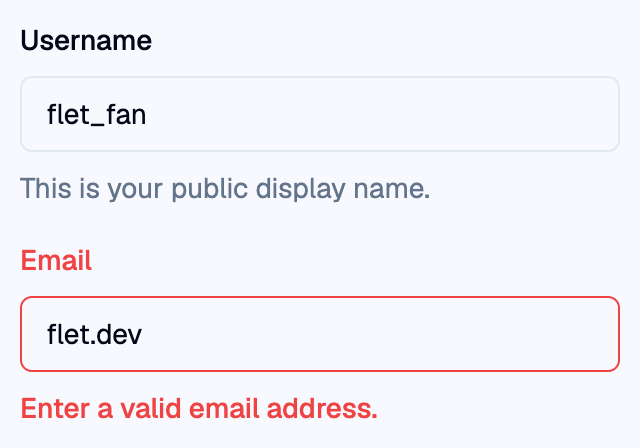
To validate, check the values in an event handler and set error_text on each
invalid field. Set it back to None once the value is valid. This sign-up form
shows errors when it is submitted, and after that each field checks itself
again as it changes:
Shadcn form
import re

import flet_shadcn_ui as shad

import flet as ft


def main(page: ft.Page):
    page.title = "Shadcn form"

    username = shad.Input(
        key="username",
        label="Username",
        placeholder="flet_fan",
        description="This is your public display name.",
    )
    email = shad.Input(
        key="email",
        label="Email",
        placeholder="you@example.com",
        keyboard_type=ft.KeyboardType.EMAIL,
    )
    password = shad.Input(
        key="password",
        label="Password",
        password=True,
        description="At least 8 characters.",
    )
    role = shad.Select(
        key="role",
        width=340,
        label="Role",
        placeholder="Select a role",
        options=[
            shad.SelectOption(value="developer", text="Developer"),
            shad.SelectOption(value="designer", text="Designer"),
            shad.SelectOption(value="manager", text="Manager"),
        ],
    )
    terms = shad.Checkbox(key="terms", label="I accept the terms and conditions")
    status = ft.Text()

    # Each rule returns an error message, or None when the value is valid.
    rules = {
        username: lambda: (
            "Username must be at least 2 characters."
            if len(username.value.strip()) < 2
            else None
        ),
        email: lambda: (
            None
            if re.fullmatch(r"[^@\s]+@[^@\s]+\.[^@\s]+", email.value)
            else "Enter a valid email address."
        ),
        password: lambda: (
            "Password must be at least 8 characters."
            if len(password.value) < 8
            else None
        ),
        role: lambda: None if role.value else "Select a role.",
        terms: lambda: None if terms.value else "You must accept the terms.",
    }
    submitted = False

    def validate(field) -> bool:
        field.error_text = rules[field]()
        return field.error_text is None

    def revalidate(e: ft.Event):
        # Errors appear on submit; after that, fields re-check as they change.
        if submitted:
            validate(e.control)

    def submit(e: ft.Event[shad.Button]):
        nonlocal submitted
        submitted = True
        # Validate every field (not just up to the first error).
        if all([validate(field) for field in rules]):
            status.value = f"Account created for {username.value}!"
        else:
            status.value = ""

    for field in rules:
        field.on_change = revalidate

    page.add(
        ft.SafeArea(
            content=ft.Column(
                width=340,
                spacing=16,
                controls=[
                    ft.Text("Create an account", size=20, weight=ft.FontWeight.W_600),
                    username,
                    email,
                    password,
                    role,
                    terms,
                    shad.Button("Create account", key="submit", on_click=submit),
                    status,
                ],
            )
        )
    )


if __name__ == "__main__":
    ft.run(main)